Git - Initialize a new repository using git init
This article covers how to use the command ‘git init’.
If you’re not sure if you have installed git, or where to run the commands, skim through my post here: Where do I run Git Commands?
If you want to create a new empty repository, or you want to convert an existing project into a git repository, you can use the git init command.
If you cd to your project subdirectory, you can simply run git init:
git initFor example:
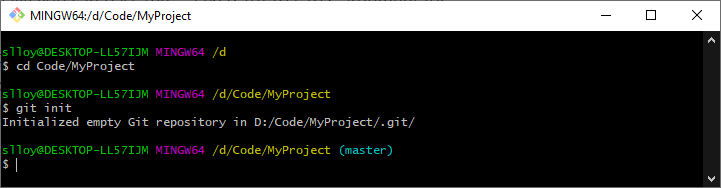
This will create an empty git repository in your current subdirectory, by adding a .git folder.
Initialize in a specific directory
You can otherwise supply the directory to the command:
git init <directory>For example:
$ git init Code/MyProjectWhat is in the .git folder?
This folder contains all of the initial information required for version control, including:
- /hooks - Example hook scripts, that run when certain actions occur.
- /info - Basic information about the repository, including exclusion patterns to ignore
- /objects - All of the git objects, where the repository content is stored
- /refs - Reference pointers to commit objects
- HEAD - Current checked out branch
- config - Git configuration
- description - Repository description
Try for yourself!
You can have a look at the above examples in this sandbox: