How to Use an SEO MCP Server in Claude Code for Keyword Research
I had a SaaS idea for a platform that generates business documents (invoices, work orders, quotes, certificates, etc). I know SaaS isn’t fashionable in 2026, with $300 billion worth of market value disappearing from SaaS companies just last month, but nevertheless I had an idea and wanted to give it a shot.
This is not my first attempt at creating a SaaS application, and most developers who’ve gone down this route have probably experienced the same pattern:
- Spend several weeks/months/years building something
- Launch it
- Poorly promote it
- Hear crickets
This time I wanted to know if anyone would actually use it before I wrote a single line of backend code.
I needed keyword data, competitive analysis, and search volumes. Previously I’ve done this by spending lots of money on SEO service subscriptions and by spending lots of time trawling through dashboards and graphs.
And in the age of AI, where everyone can be lazier more efficient, I wondered if I could get Claude to do the work for me…
And that’s when I discovered you can plug SEO tools directly into Claude Code using MCP servers.
What Is an MCP Server?
If you’ve been using Claude Code, you might have noticed it supports something called MCP, the Model Context Protocol.
An MCP server is a lightweight service that gives Claude access to external tools. Instead of switching to Ahrefs in a browser tab, copying data into a spreadsheet, and then going back to your editor, you configure an MCP server once.
And then just ask Claude for keyword data in the same terminal where you’re writing code.
The protocol is open, so anyone can build an MCP server. There are servers for GitHub, Slack, databases, and file systems. For this article, the important ones are SEO data providers like DataForSEO.
The ecosystem is still young. Of the 14 major SEO platforms that offer APIs (Ahrefs, SEMrush, Moz, Majestic, and others), I could only find three that have MCP servers today: DataForSEO (official), SE Ranking (official), and SEMrush (community-built). That gap will probably close fast, but right now, if you want SEO data in your AI workflow, your options are limited.
The practical upside: you can do keyword research, competitive analysis, and content planning without switching tools. You ask for what you need in plain English, and Claude calls the SEO API on your behalf and returns structured data you can act on immediately.
Setting Up the DataForSEO MCP Server in Claude Code
Here’s how to get SEO data flowing into Claude Code.
Prerequisites
- Claude Code installed and working (if you need an API key, see my guide on how to get your Claude API key)
- A DataForSEO account with API credentials
- Your DataForSEO API login and password stored securely (I keep mine in a
.envfile, here’s how to keep API keys out of Git)
Step 1: Install the MCP Server
DataForSEO provides an official MCP server package. Install it globally:
npm install -g dataforseo-mcp-serverStep 2: Configure Claude Code
Claude Code has two scopes for MCP server configuration:
- User scope (
~/.claude.json): Available in every Claude Code session, regardless of which project you’re in. Best for general-purpose tools like SEO research. - Project scope (
.mcp.jsonin your repo root): Only available when working in that specific project. Can be checked into source control so your team shares the same config. Claude Code will prompt for approval before using project-scoped servers.
For an SEO MCP server, user scope makes more sense. You’ll want keyword research available no matter which project you’re in.
Add this to ~/.claude.json:
{
"mcpServers": {
"dataforseo": {
"command": "npx",
"args": ["-y", "dataforseo-mcp-server"],
"env": {
"DATAFORSEO_LOGIN": "your-login-here",
"DATAFORSEO_PASSWORD": "your-password-here"
}
}
}
}Replace the credentials with your own. If you’re using a .env file, reference the environment variables instead of hardcoding them.
Step 3: Verify It Works
Start Claude Code and run the MCP command:
/mcpYou should see something like this:
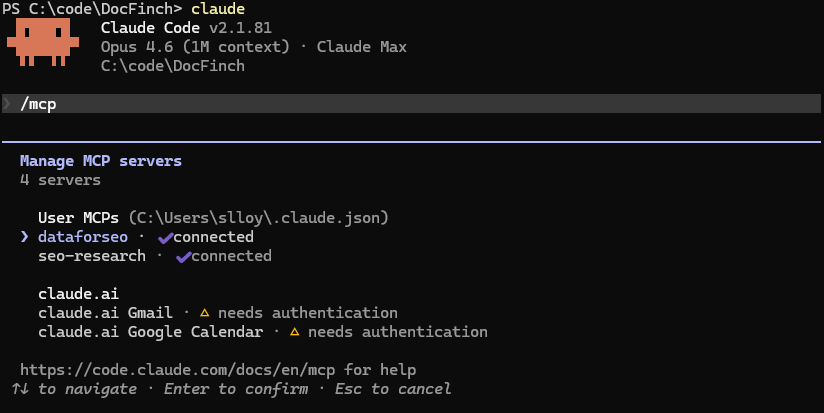
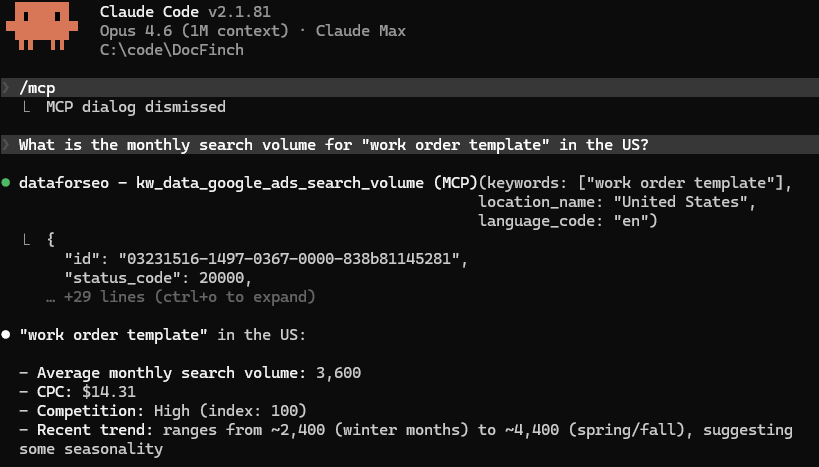
Now we can ask it something simple:
What is the monthly search volume for "work order template" in the US?If the MCP server is configured correctly, Claude will call the DataForSEO API and return real keyword data: search volume, competition level, CPC, and monthly trends. No browser, no spreadsheet, no copy-pasting.
The Research: Finding 510K Monthly Searches Hiding in Plain Sight
With the SEO MCP server connected, I started exploring my idea. The project (DocFinch) would be a document generator platform. But which document types should it support first? And was there actually demand?
I started with obvious seed keywords:
What are the search volumes and keyword difficulty for
"invoice template", "work order template", and "quote template"
in the US?The results were immediately interesting. “Invoice template” had massive volume (241,500/month) but a keyword difficulty of 55. The SERPs were locked down by Canva, Xero, and other established SaaS players. Not a great first target for a new domain.
But “work order template”? 3,600 monthly searches with a KD of just 2. And “quote template” at 880 searches with KD 0.
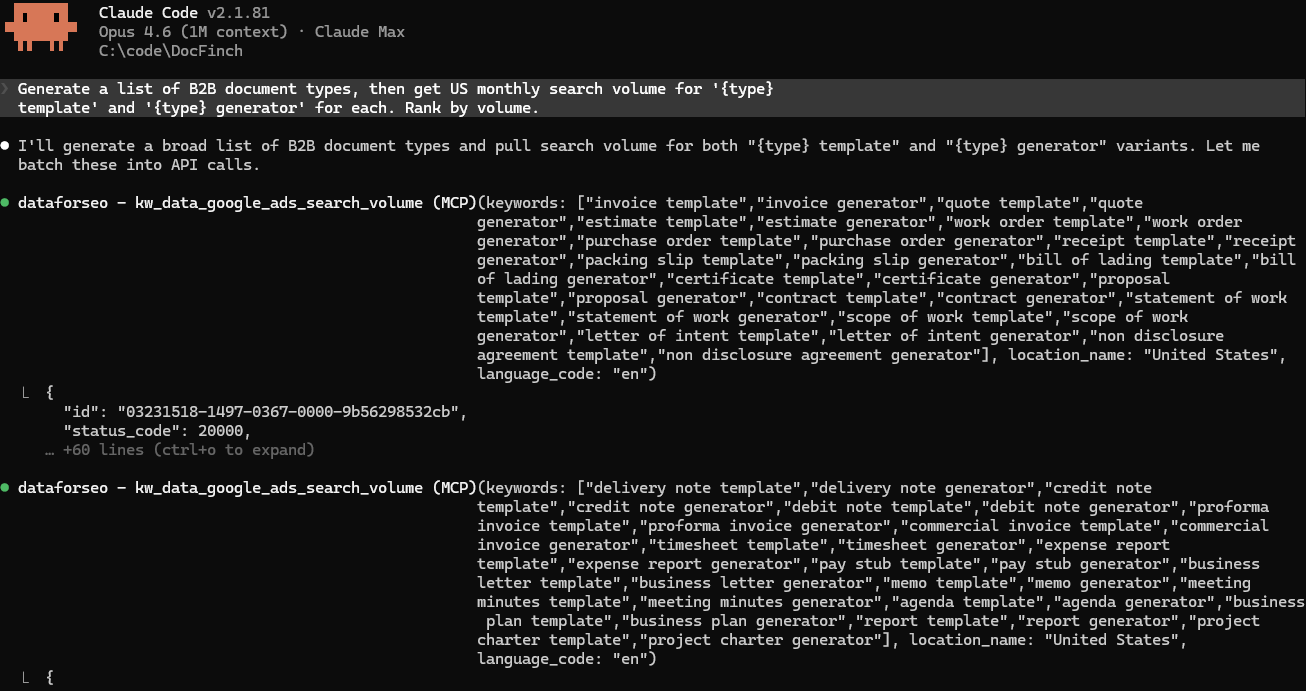
I kept pulling threads. I asked Claude to explore related document types:
Generate a list of B2B document types.
Then get US monthly search volume for
'{type} template' and '{type} generator' for each.
Rank by volume.Dozens of business document types (statements of account, remittance advice, credit notes, PAT testing certificates) had meaningful search volume and virtually zero competition. The SERPs for these keywords were dominated by government PDFs, outdated blog posts, and generic template farms. Nobody had built a proper tool for them.
The Scoring Matrix
I ended up researching 27 document types across the US and UK markets. After pulling volume, keyword difficulty, CPC, and longtail keyword counts through the DataForSEO MCP server, I cross-validated the most promising keywords using a second MCP server, seo-research, which pulls keyword difficulty from a different data source. This required a CapSolver account for CAPTCHA solving (I added $10 and used 12 cents). I ran these one at a time to avoid rate limiting, so I only validated the keywords that looked interesting from the initial pull.
With both tools showing the same thing, I built a scoring formula to rank the document types:
| Factor | Weight | Why it matters |
|---|---|---|
| Search volume | 25% | Is anyone looking for this? |
| Ease (inverse of KD) | 30% | Can a new domain rank? |
| CPC | 15% | High CPC signals commercial intent |
| Longtail depth | 15% | Are there sub-niches to target? |
| SERP weakness | 15% | How beatable is the current competition? |
The top five after scoring:
| Rank | Document Type | Monthly Volume | Avg KD | Score |
|---|---|---|---|---|
| 1 | Pay Stub / Payslip | 64,520 | 16 | 0.733 |
| 2 | Work Order / Job Sheet | 4,500 | 4 | 0.722 |
| 3 | Quote / Estimate | 27,000 | 15 | 0.719 |
| 4 | Statement of Account | 790 | 0 | 0.713 |
| 5 | Commercial Invoice | 5,450 | 5 | 0.708 |
Across all 22 viable document types, the total addressable search volume exceeded 510,000 monthly searches.
Not all of these are easy targets. In fact, invoice alone accounts for 374K but has KD 45. But the low-KD, low-competition types collectively represented over 50,000 monthly searches that were essentially uncontested.
This was data I could act on.
What Made the MCP Workflow Different
The biggest win wasn’t speed (though it was faster). It was context.
When I asked “which of these keywords should I target first?”, Claude could factor in everything at once: the search volumes, the competition data, my tech stack, and the fact that I was working with a brand-new domain with zero authority. It could see my codebase and the SEO data in the same conversation.
When I asked about site architecture, it already knew which keywords I was targeting. When I asked about keyword difficulty, it already knew I was building with Astro on a fresh domain.
The total cost? Drumroll please…
$2.42
It was $2.30 for DataForSEO (which requires a $50 minimum deposit, so I still have most of that balance left, and I intend to use it!) and $0.12 on CapSolver for the cross-validation. Under $2.50 for keyword data that would have cost $99+/month on Ahrefs or SEMrush.
Validation: Content Before Code
The keyword research gave me some confidence that demand existed. But I still didn’t want to build a full-stack document generator on faith. So I took an unconventional approach: ship content first, build the product later.
I used Astro (a static site generator) to create 35 landing pages, one for each target keyword and its regional/industry variants. No backend. No PDF generation. No user accounts. Just static HTML pages targeting “work order template”, “commercial invoice template”, “remittance advice template”, and so on.
Each page explains what the document type is, what it should include, and answers common questions. The pages are designed to rank for informational queries while the generator is being built.
If these pages rank and attract traffic, I’ll know which document types to build generators for first.
If they don’t rank, meh. I’ve spent days instead of months finding out.
The site is live at docfinch.com. At the time of writing, it’s been less than a week since launch, so it’s too early for meaningful ranking data. I’ll write an update when I have Search Console data at the 30 and 60 day marks.
Setup Checklist
Quick reference for getting an SEO MCP server running in Claude Code:
| Step | Action |
|---|---|
| 1 | Create a DataForSEO account |
| 2 | Get your API login and password from the dashboard |
| 3 | Store credentials in a .env file (how-to guide) |
| 4 | Install the MCP server: npm install -g dataforseo-mcp-server |
| 5 | Add the server config to your Claude Code settings (see JSON above) |
| 6 | Start Claude Code and ask for keyword data to verify |
| 7 | Start researching. Seed keywords first, then explore related terms |
What I’d Do Differently
Not much. The workflow held up well! I probably wouldn’t tell Claude what my DataForSEO budget is, as it kept trying to anticipate how much it had spent and consistently overestimated (It thought it spent $20 when it was only $2).
I would probably create a skill to get Claude to search DataForSEO for volume & keyword difficulty, then narrow it down to only those viable, and perform additional SERP competition searches and cross-reference with seo-research MCP. Having all of those instructions in one place so that I could call a single command would have saved a bit of time.
But I’m nitpicking. These things took minutes and I’ve saved days.
Try It
MCP servers are still early. The SEO ecosystem around them is even earlier. If you do keyword research regularly and already use Claude Code, adding an SEO MCP server takes about ten minutes and costs almost nothing to run. The setup instructions above are everything you need!